
Every control unit in your car, in plain words
Final OBD reads the faults stored in the engine, gearbox, ABS, airbags and every other module, tells you what each one means and shows you how the car is doing live, with five themes for the gauges. On Android, and on iPhone now in beta.
Coming soon
Mid to late October 2026
If you want to try it in your car before anyone else, send us your email and we will add you as a tester.
info@finalobd.comStart for free with Free. Pro costs €24.99 and Workshop, the full version, €99.99. You pay once: there’s no subscription.
What people use it for
Hardly anyone buys an OBD reader for fun. You plug it in because a warning light has come on, because the inspection or the service is due, or because you’re about to buy a used car.
A warning light has come on
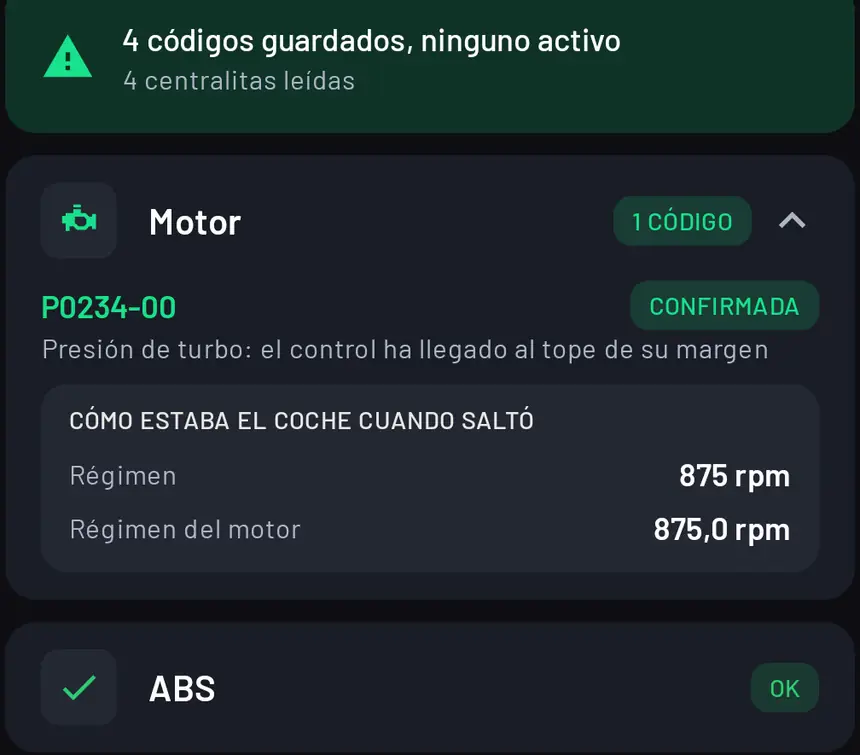
Read the fault and the app tells you in plain words what it means and how the car was running when it was logged. You know whether you can keep driving, and if you go to a garage, you know what they’re talking about.
The inspection is due
It reads through the OBD socket exactly what the test centre reads and gives you a verdict before you go: pass, fail, and what needs fixing.
You’re buying a used car
Plug it in before you pay: faults from every control unit, the mileage each one has stored and a used car report as a PDF to show or keep.
You do your own servicing
Reset the service reminder, regenerate the particulate filter or bleed the brakes without a trip to the garage just for that. With Workshop, on cars that allow it: the makes table tells you whether yours does.
You want to see how the engine is doing
Boost, coolant and oil temperatures, battery and whatever your brand keeps apart, live on your phone.
You don’t want another subscription
Free is free for good. Pro and Workshop are paid for once and they’re yours. No monthly fees, no renewals and no ads.
What it does, and in which version
The needle on each line tells you: bottom left, Free; straight up, Pro; in the red, Workshop.
- Pro
An in-depth check of every control unit
With the car stationary, the app goes into each control unit the way garage equipment does: engine, gearbox, ABS, airbag, steering, body and the rest, one by one. While it runs, the car may beep or briefly light up a warning, the brake light for example. That’s normal and it goes off when it’s done.
- Free
Faults explained in plain words
Every code with what it means in everyday language, and whether it’s confirmed or pending. Anything that only failed once in the past is shown separately, so it doesn’t worry you. Engine faults can be read for free; with Pro, every control unit, how the car was running when each fault was logged, and clearing them once they’re fixed.
- Free
Live data
Revs, speed, boost, coolant, oil and intake temperatures, mixture and battery. With Pro, also the extra readings your make keeps to itself, with charts and CSV logging.
- Free
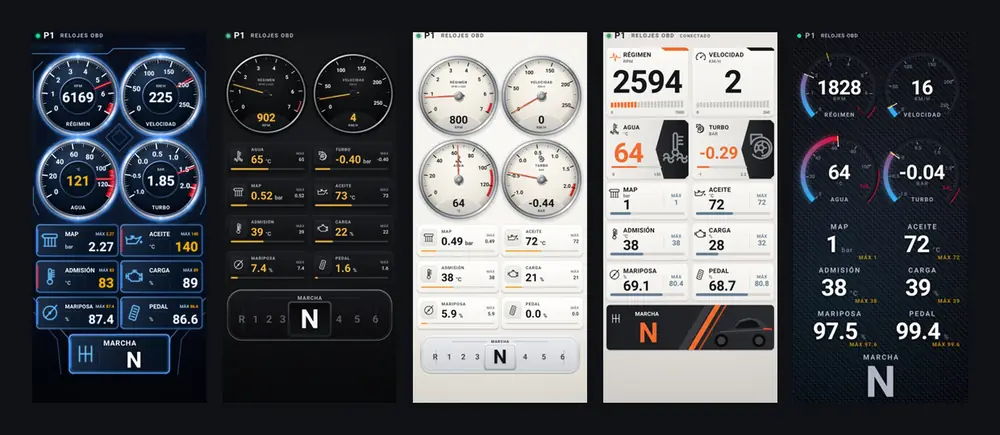
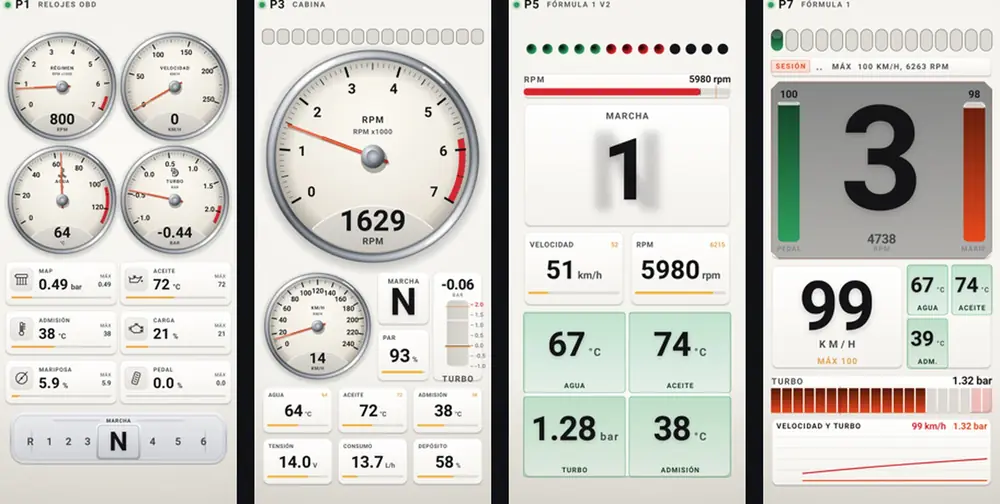
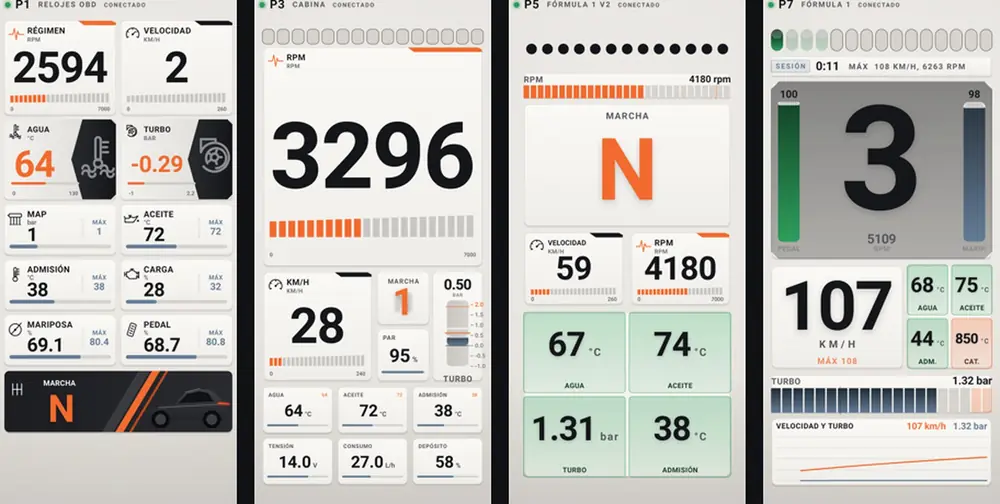
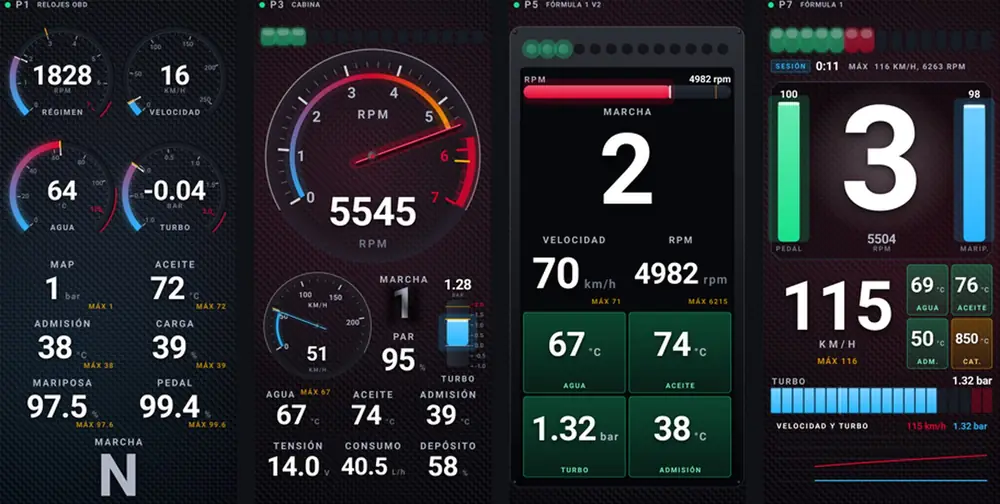
Gauges for driving, with five themes
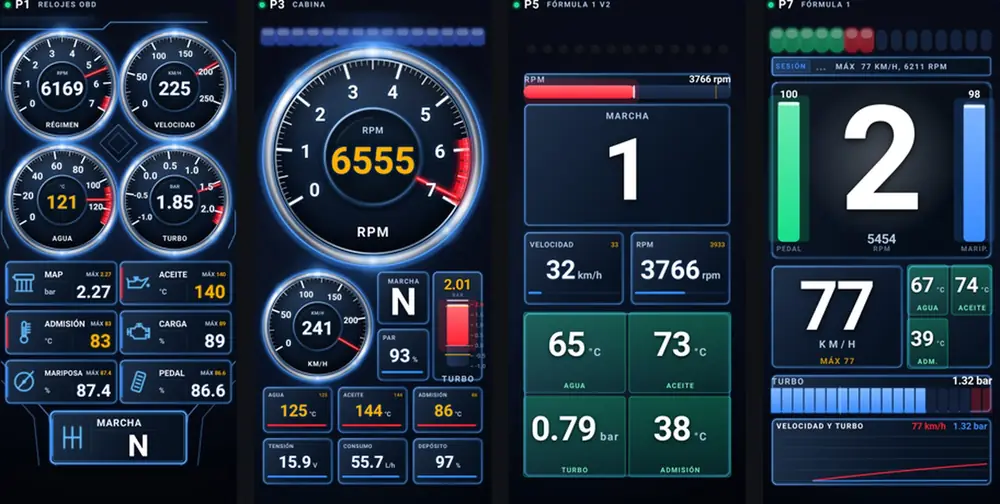
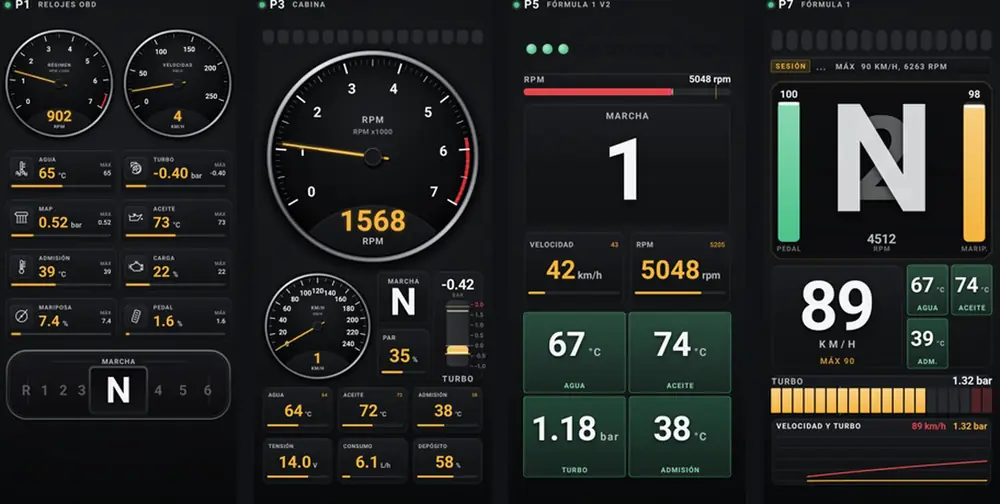
Gauges, Cockpit, Formula 1, Digital and more, with a shift light, in portrait or landscape. Five themes for all of them: Chrome Blue, Graphite, Classic, Racing and Original.
- Pro
Your own dashboards
Build up to ten dashboards your way: two, four or six gauges, numbers in a grid or a mix, with the data you choose.
- Pro
Pass or fail inspection check
It reads through the OBD socket what the test centre reads and judges it by the official Spanish ITV inspection manual: pass, fail or something still to read, and what needs fixing. Full details below.
- Pro
Lifetime fuel consumption
On cars registered from 2021, all the fuel used and all the distance covered since the car left the factory, the same counters the inspection records. For now it’s an approximate figure, and the app says so right next to it.
- Pro
Odometer check
The mileage stored in each control unit, side by side. If one holds more than the dashboard shows, that’s the classic sign of a clocked car. Matching figures are a good sign, not proof.
- Pro
Serial numbers of every control unit
The car’s details, with its VIN and the serial number of every control unit that answers. Handy for ordering the exact part or just keeping a record.
- Free
Used car report
A PDF made for buying or selling: the car’s details, faults, the inspection check and the mileage from each control unit, with what to look at before you shake hands. Plus a text summary to paste into an ad or send in a message.
- Pro
Timers
0 to 100, 80 to 120, quarter mile and braking, using the phone’s GPS. To compare before and after a change.
- Workshop
Servicing
Reset the service reminder, regenerate the diesel particulate filter, bleed the brakes or calibrate sensors. Whatever your make allows.
- Workshop
Component tests
Switch a part on from your phone to see if it responds, one at a time, without taking anything apart.
- Workshop
Coding and one-tap changes
Turn control unit features on or off, or apply ready-made changes for your model without knowing which value goes where. The app reads each value back before and after, and whatever you’ve changed stays marked.
The inspection, before you go
At a Spanish ITV test centre they plug a reader into the car and look at what it says. Final OBD reads the same thing and judges it by the rules of the official ITV inspection manual, version 7.9, in force since January 2026. Most European roadworthiness tests read OBD in a similar way, but where you live, your country’s rules have the final say.
The verdict is one of three: pass, fail, or something still to read. It never says pass without having read everything. Each defect comes with its point in the manual and whether it’s minor or major, and the faults to fix are on the same screen, explained.
The manual applies this check to Euro 5 and Euro 6 cars and vans. The emissions monitors are still shown, because they give away a recent clear, but they don’t decide anything: the manual doesn’t look at them. Final OBD isn’t the test centre, but it means you don’t go in blind.
- The OBD socket answers
- If the test centre can’t read the car, that’s a major defect.
- Engine warning light off
- If it’s on, that’s major, even if the car drives fine.
- No confirmed or permanent faults
- A single one is major. Permanent faults can’t be cleared: they go away on their own once the car has checked the fault is fixed.
- Distance driven with the light on
- If the light is off now but the car covered more than a kilometre or ran for more than an hour with it on, that’s major. It’s what gives away faults cleared just before the test. If the car doesn’t report it, it’s minor.
- Lifetime fuel consumption
- Since 2021 the inspection also records the car’s total fuel used and total distance. The app shows you both, for now as an approximate figure.
Five themes for your gauges
Every screen changes its look with one tap in Settings. These are screenshots of the app, not retouched.
Pay once, or not at all
Three versions. Start for free with Free and only move up if you need to. No subscriptions, no monthly fees, no renewals and no ads.
Free
To see how the car is doing.
Free, for good
- Gauges with standard OBD data
- Read engine faults, explained
- PDF reports, including the used car report
- Five themes for the gauges
- Demo mode, no car needed
Pro
To get to know your whole car.
One-off payment
- Everything in Free
- In-depth check of every control unit, with faults explained and clearing them
- How the car was running when each one was logged
- Pass or fail inspection check and lifetime fuel consumption
- Odometer check and control unit serial numbers
- Your make’s own data and gauge layout, and your own dashboards
- Charts, timers and logging
Workshop
The full version, for people who get their hands dirty.
One-off payment, for life
- Everything in Pro
- Servicing, such as resetting the service reminder
- Component tests
- Control unit coding
- Ready-made one-tap changes
Prices include VAT. Pro and Workshop are bought inside the app and paid through Google Play, with the account you already use. They aren’t subscriptions: you pay once and they’re yours for good, and if you change phone you get them back with the same account.
Will it work with my car?
The basics (gauges, engine faults and the inspection check) work on any car with OBD2: in Europe, petrol cars from 2001 and diesels from 2004. Everything else depends on what the app knows about your make, and that’s listed model by model: 95 makes, 1,212 models, 2,237 engines and 43,284 fault codes explained. Right now it does the most on the Volkswagen group (Volkswagen, Seat, Cupra, Skoda and Audi), on BMW and Mini, and on Fiat, Abarth and Alfa Romeo.
| Make | Models | Faults | Settings | Service | One tap |
|---|---|---|---|---|---|
| Seat | 13 | yes | yes | no | yes |
| Volkswagen | 68 | yes | yes | no | yes |
| Abarth | 8 | yes | yes | no | yes |
| BMW | 40 | yes | yes | no | yes |
| Renault | 30 | yes | yes | no | no |
| Peugeot | 35 | yes | no | no | no |
- A Bluetooth OBD2 reader
- Any ELM327-type reader will do for the basics; for every control unit and the Workshop features, get a good one, like a vLinker or an OBDLink.
- An Android phone
- With Bluetooth. On iPhone, a Bluetooth LE reader or an Apple vLinker.
- Five minutes
- Plug the reader in under the steering wheel, turn the ignition on, open the app and pick the reader. Next time it remembers it.
Coming next
This is on its way and will arrive with app updates. We’re telling you so you know where it’s heading, not to sell it to you before it’s ready.
More data for each model, thanks to the cars using it
If you say yes, the app reports what worked on your car and what didn’t, with no personal data. That way each model keeps gaining readings and features proven on real cars.
Settings marked by whether they work on cars like yours
Before you change something, you’ll know whether that setting has already worked on cars just like yours, whether it failed, or whether nobody has tried it yet.
Older cars
European cars from the late nineties and early two thousands that talk over the K-line, such as BMW E-series or the Fiat, Renault, Peugeot, Opel and Volkswagen models of those years. It’s already being tested.
iPhone
The iPhone version. The reader will have to be Bluetooth LE (BLE), like the vLinker MC+ or the Vgate iCar Pro BLE.
Questions
Is it a subscription?
No. Free is free for good, and Pro and Workshop are paid for once and are yours for life. No monthly fees, no renewals, no recurring charges.
What’s the difference between Pro and Workshop?
Pro is for getting to know the whole car: the in-depth check of every control unit and clearing faults, the pass or fail inspection check, the odometer check, your make’s own data, your own dashboards, charts and timers. Workshop is the full version: everything in Pro plus the jobs a garage does, such as servicing, component tests, control unit coding and one-tap changes.
Can I break anything?
Reading faults and watching data doesn’t change anything in the car. Clearing faults, servicing, coding and one-tap changes do write to the control units: do it with the car stationary, the battery in good shape and knowing what you’re changing. Before writing, the app reads the current value, and afterwards it reads it again to check the change has gone in.
Why can I read my car but not change anything?
Some manufacturers fit an electronic lock so that only their own equipment can write to the control units. That’s the case with Stellantis (Peugeot, Citroën, Fiat, Opel, Vauxhall and co.) since 2018, the Volkswagen group since 2020 and some recent Mercedes, Renault and Nissan models. On those cars you can read everything, but you can’t make changes.
What if I’m not convinced?
Before paying you can try it in demo mode and use Free with your own car. Refunds follow the Google Play rules.
What happens if I change phone?
Purchases are tied to your Google account. Install the app on the new phone with the same account and you get back what you’ve already paid for.
Is there an iPhone version?
It is already in beta. On iPhone the reader has to be Bluetooth LE (BLE), like the vLinker MC+ or the Veepeak OBDCheck BLE+, or an Apple vLinker MS or FS, paired in the iPhone settings.
What data does the app send?
Only if you say yes, technical data to improve compatibility: phone model, car details and which features worked or failed. No contacts, no exact location, no advertising. It’s all in the privacy policy.
Does it count as an official report?
No. Final OBD is a measuring tool, not a certified instrument. It helps you understand what’s going on, but it doesn’t replace the MOT or a garage when you need one.
How do I get in touch?
At info@finalobd.com. If your car isn’t in the table or something doesn’t add up, tell us the make, model and year.
Will it tell me if I’ll pass the inspection?
It tells you whether you’d pass on what the inspection reads through the OBD socket, using the rules of the official Spanish ITV manual, and what needs fixing if not. The rest of the test (brakes, lights, tyres, emissions) is checked at the test centre, and the app can’t see any of that.
Is it any use for buying a used car?
Yes, it’s one of the things it’s used for most. Plug it in before you pay: you’ll see the faults in every control unit, whether any were cleared recently and the mileage each one has stored, and you can print the used car report as a PDF. Matching mileage is a good sign, but it doesn’t guarantee nobody has tampered with it, and the report says exactly that.
Try it on your car
Install it for free, have a look in demo mode and plug it in. If you like it, move up to Pro or Workshop whenever you want.
Coming soon
Mid to late October 2026
If you want to try it in your car before anyone else, send us your email and we will add you as a tester.
info@finalobd.com